Gravity Mechanics in Space Games
On this page
Gravity turns empty space into a landscape of slopes and valleys. A shot that would fly straight past a planet curves around it instead, a pod gets pulled into a new orbit, and a lander has to fight a constant pull toward the ground. This guide explains the gravity ideas behind three of our games, Gravity Orbit, Planet Hopper and Rocket Landing, and separates the real science from the simplified arcade rules.
Real gravity in one minute
Real-world concept: every object with mass attracts every other object with mass. The pull is stronger for more massive objects and gets weaker as distance increases; in the classic Newtonian description it falls off with the square of the distance, so doubling the distance cuts the pull to a quarter. Near the surface of a planet or moon the pull is nearly constant, which is why a dropped object on Earth speeds up at a steady rate. Different bodies have different surface gravity: the Moon's is roughly one-sixth of Earth's.
Arcade games borrow these ideas but tune them heavily. Our games use simplified, arcade-friendly gravity. It is designed to be readable and fun, not to teach real orbital mechanics or piloting.
Gravity wells: stronger when closer
A gravity well is the zone around a body where its pull matters. Games usually compute the pull from each planet every frame and add it to the moving object's velocity. A common arcade formula looks like this:
pull = strength / (distance * distance)
The pull is then applied in the direction of the planet. Many games also clamp the pull at very short distances so that an object passing close by is not flung away at absurd speed, or ignore planets beyond a certain range so the screen stays predictable. These are design choices, not physics.
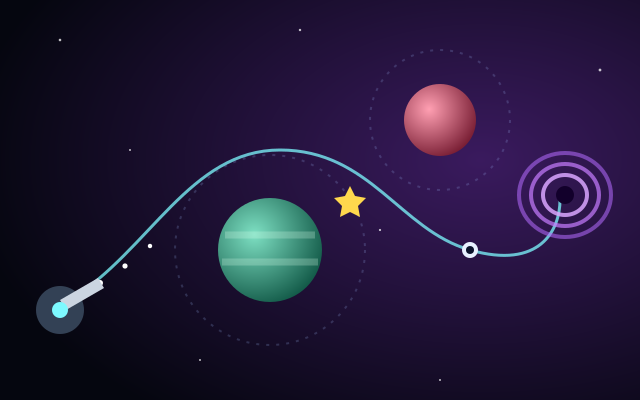
In Gravity Orbit, planets pull your probe more strongly when it is closer and bend its path. That single rule creates the whole puzzle: a probe aimed far from a planet barely curves, while one aimed close swings sharply around it. Hit the planet and the attempt is lost; leave the screen and it is lost too.
Orbits: falling and missing
Real-world concept: an orbit is a path where an object is constantly falling toward a body but moving sideways fast enough that it keeps missing it. Too slow and it spirals in or crashes; fast enough and it can escape entirely. Real orbits are generally ellipses, with circles as a special case.
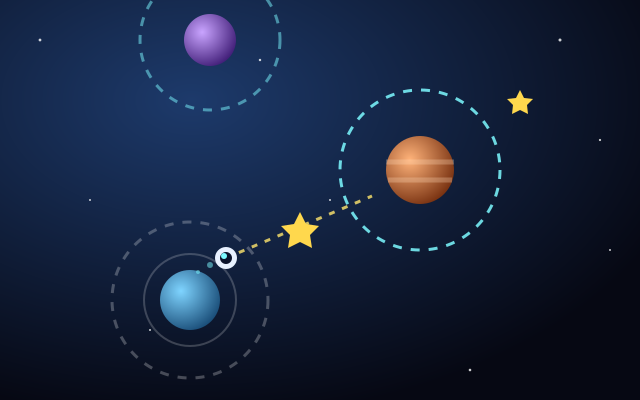
In games: true orbits are hard to maintain by hand, so arcade games often simplify them. Planet Hopper is a good example. Your pod circles a planet on a fixed orbit with no fuel or thrust to manage. When you press Space, click or tap, the pod leaves in a straight line along the direction it was moving at that moment. If that line passes inside another planet's gravity ring, you are captured into its orbit.
The straight-line launch does echo a real idea: an object released from circular motion heads off along the tangent, the direction it was traveling at that instant, not straight outward. The capture ring, however, is pure arcade simplification. It turns a complex physical process into a clear yes-or-no target, which is exactly what a one-button game needs.
Tip: In Planet Hopper, the launch direction is where your pod is heading, not where it is on the planet. Picture a line leaving the orbit sideways, and release when that line crosses the target planet's ring. Allow for planets that drift sideways and for orbit speeds that vary between planets.
Slingshots and curved shots
Real-world concept: real spacecraft use gravity assists, also called slingshot maneuvers, flying close past a planet to change their speed and direction without spending as much propellant. The details depend on the planet's own motion around the Sun, and mission planners calculate them with great care.
In games: an arcade slingshot is simpler. It usually just means using a planet's pull to bend your path around an obstacle toward a goal you could not reach in a straight line. Gravity Orbit is built around this idea. You aim with Left/Right (or Up/Down) or by pointing with the mouse or a finger, hold Space, LAUNCH, or press on the game to charge power, and release to launch. The goal is the wormhole; stars along the way are optional bonus.
A practical way to plan a slingshot shot:
- Find the direct line. Look at the straight path from the probe to the wormhole and note which planets sit near it.
- Choose a planet to bend around. Pick one on the side you want to curve toward.
- Use the aim preview. The short dotted preview shows the start of your path. Aim so it passes beside the planet, not at it.
- Tune power, not just angle. A faster probe spends less time near the planet and curves less. A slower probe bends more, but risks being pulled in.
- Adjust one thing per attempt. Change either angle or power, never both, so you learn what each change does.
That last step matters because you have three attempts, and fewer attempts earn a bonus. The early levels are hand-designed and good for learning; later levels are generated, so a solid general method pays off more than memorizing specific shots.
Landing: fighting a steady pull
Real-world concept: landing on a body with no atmosphere means there is no air to slow you down, so any descent speed has to be removed with engine thrust. The lower the gravity, the gentler the pull, but the principle is the same.
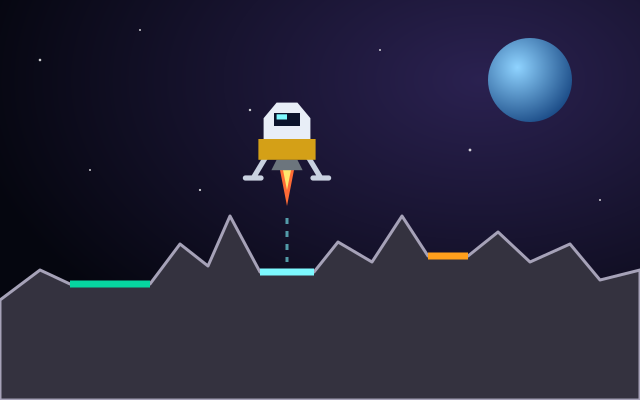
In games: Rocket Landing uses a simple, steady downward gravity. Up, W, Space or THRUST fires the main engine; Left/Right rotate the lander. To land you need a flat pad, low vertical speed, low horizontal speed and a near-upright angle, and the HUD shows your speeds and says OK or TOO FAST. Each successful landing moves you to a new moon with different terrain and gravity, so the thrust timing that worked on one moon may be too much or too little on the next.
| Situation | What gravity is doing | Response |
|---|---|---|
| Falling fast early | Speed keeps building while you wait | Brake with short bursts well above the pad |
| Drifting sideways | Nothing; gravity only pulls down | Tilt against the drift, thrust briefly, then straighten |
| Hovering low | Constantly pulling you down, burning your fuel | Descend steadily instead of hovering; fuel carries over |
| New moon | Pull is stronger or weaker than before | Test with a small burst and watch the speed readout |
Smaller pads carry higher multipliers (x2, x3, x5), and score multiplies the pad value by a base plus a fuel bonus. Because fuel carries over, a careful descent now leaves more room for a risky small pad later.
Why good gravity feels fair
Gravity mechanics can easily feel random if the player cannot predict them. The games that handle it well follow a few rules:
- Consistent rules. The same planet always pulls the same way.
- Visible cues. Gravity rings in Planet Hopper and the aim preview in Gravity Orbit show you what the rules are doing.
- Short feedback loops. Quick attempts let you test a theory and adjust.
- Honest failure. When you crash, you should be able to see why.
For the other half of the picture, including inertia, thrust and drag, read space game physics explained. To find more games built around worlds and orbits, see our guide to planet-based arcade games or browse the planet games category.
Sources and further reading
- NASA Space Place (general-audience science)
- NASA Science: Solar System
- ESA: Science & Exploration